Building an AI Agent That Turns Figma Designs Into Pixel-Perfect Code
I built Vesper, an AI-powered design engineering agent for Claude Code. It reads Figma designs, maps every value to our design tokens, reuses existing components, and produces production-ready code from a single command. The workflow grew out of a real problem on our team: Figma designs and shipped code kept drifting apart, and no amount of documentation was closing the gap.
Ongoing (started Mar 2025)
Claude Code, Figma MCP, DTCG Tokens, Style Dictionary
The problem
At Diamond Kinetics, we work across multiple projects in a monorepo. Our design system lives in Figma with tokens managed through Style Dictionary. But by the time designs reached code, things would drift. Colors were close but not exact. Spacing was eyeballed. Components that already existed got rebuilt with slightly different padding. Typography was the worst of it: engineers would pull individual font values instead of referencing a type style, so updating a heading meant finding every file that hardcoded 24px bold. I wanted to close this gap at the system level, not chase it screen by screen.
The approach: make the machine do what humans forget
I started experimenting with Claude Code and Figma's MCP integration. The idea was simple: if Claude can read Figma designs and I can teach it our token system, it should be able to produce code that matches Figma exactly without anyone manually translating values. What started as a prompt engineering exercise became a full agent workflow over several weeks of iterating, breaking things, and rebuilding.
Layer 1: The token pipeline
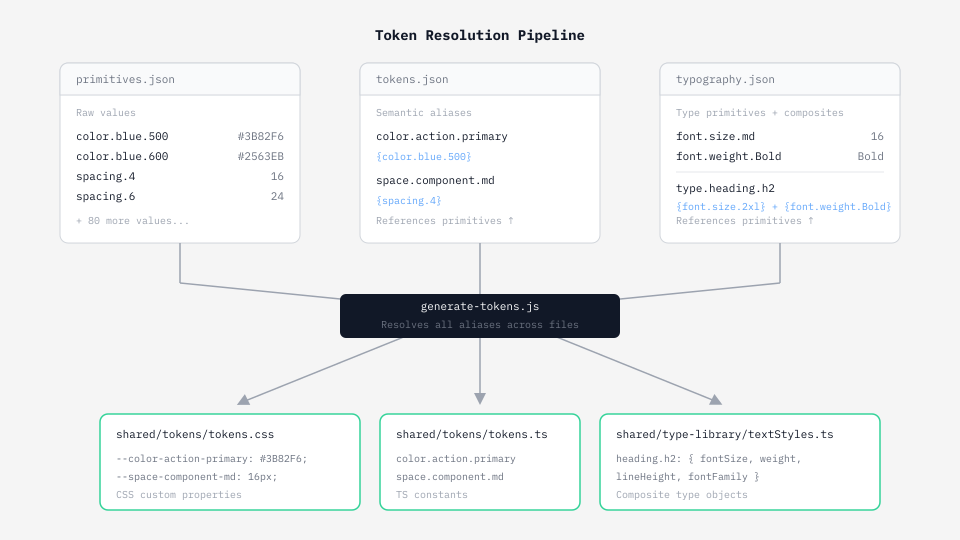
Our design tokens are split across three files in DTCG format: primitives.json has raw values like color scales and spacing units, tokens.json has semantic tokens that reference primitives (like "color.action.primary" pointing to a blue in the scale), and typography.json has font families, sizes, weights, and line heights that also reference primitives. The rule is that components only ever touch semantic tokens, never primitives directly. I wrote a generator script that resolves all the aliases across the three files and outputs shared CSS variables and a TypeScript constants file that the whole monorepo imports from one place.
Layer 2: The component registry
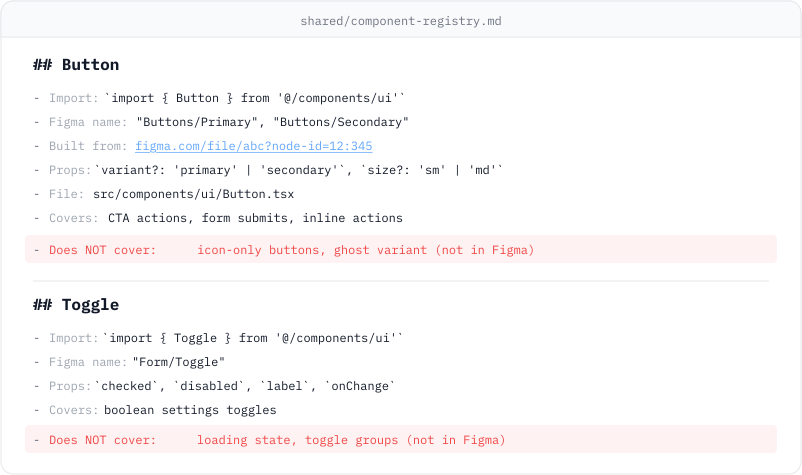
Early on, I made a mistake that taught me something important. My first version auto-generated a full component library from the tokens: buttons, cards, inputs, all scaffolded from the palette. They looked right in isolation but didn't match Figma at all because they were invented, not built from actual designs. So I scrapped that and started over with the opposite approach: the library starts empty. Components only get built when they appear in a Figma design, and they're built to exact Figma spec. Every component gets registered in a shared markdown file with its props, variants, source Figma link, and a "Does NOT cover" line that explicitly states what Figma didn't define. That line is what stops the agent from silently adding a loading state or a ghost variant that was never designed.
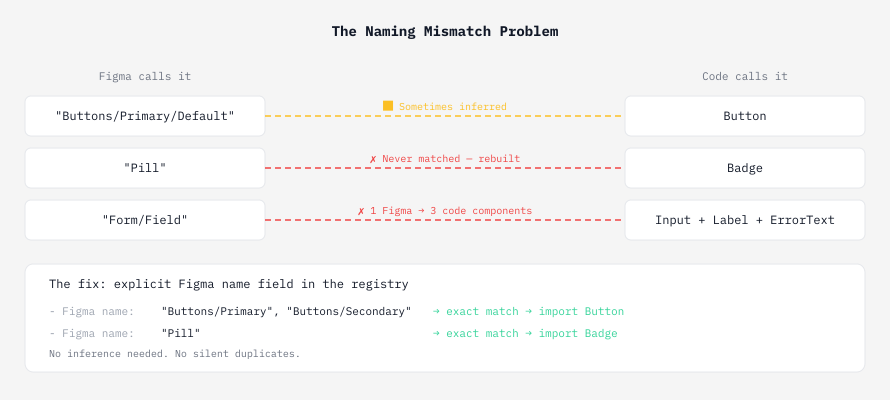
Figma calls it "Buttons/Primary." Code calls it Button. If the names don't match, the agent builds a duplicate and nobody notices.
Solving the naming mismatch
When the agent reads a Figma screen, it gets back layer names and component names exactly as Figma stores them. If Figma calls something "Buttons/Primary/Default" and the registry has "Button," the agent has to infer the match. Sometimes it got it right. Sometimes it quietly rebuilt the whole thing. The fix was adding a Figma name field to every registry entry that maps Figma's naming to the code naming. No inference, no guessing. During the pre-build audit, exact matches show as confirmed reuse, partial matches get flagged for confirmation, and anything unrecognized gets listed as new.
Layer 3: Typography as a type library
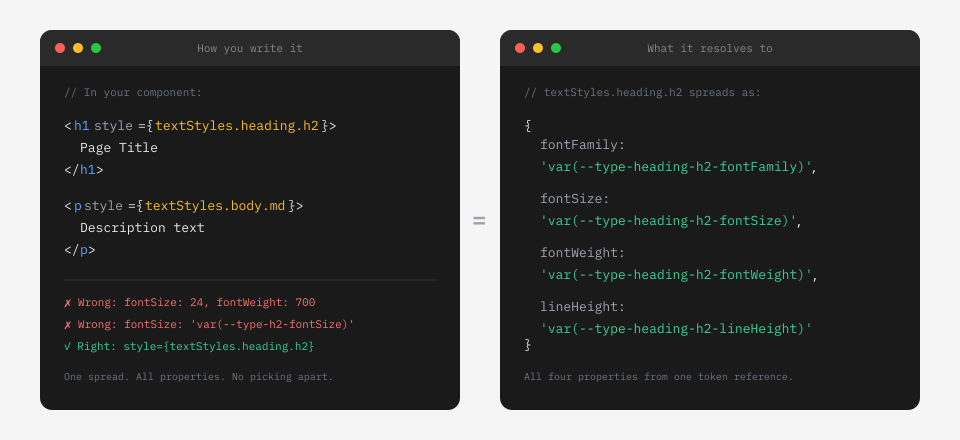
Typography was the messiest part. Our typography.json had individual primitives (font families, sizes, weights) but no composite styles combining them. And our Figma Text Style names were completely different from the token paths. I went through a few iterations: a separate mapping file, a separate generator step, a sync command. Too many moving parts. I simplified it to one step: during bootstrap, the agent reads Figma Text Styles via MCP, matches each property value against our resolved token values, and writes a single textStyles.ts file. Components import from it and spread one object per text element. No individual font-size or font-weight references anywhere in component code.
Debugging the agent itself
The hardest problem wasn't design or code. It was getting Claude Code to actually use my workflow instead of its built-in Figma integration. I had a Figma MCP connected for reading designs, but Claude kept routing Figma links to the native tool before my workflow ever loaded. I tried making the skill description more assertive. I tried unique command prefixes. None of it worked. The native tool intercepted at a lower level than skill selection. The fix was a CLAUDE.md file at the monorepo root that explicitly tells the agent: when you see a build request with a Figma link, ignore native Figma tools and load this workflow instead. CLAUDE.md is read before MCP routing decisions, so it acts as a gate. That's when things finally clicked.
Keeping the agent fast
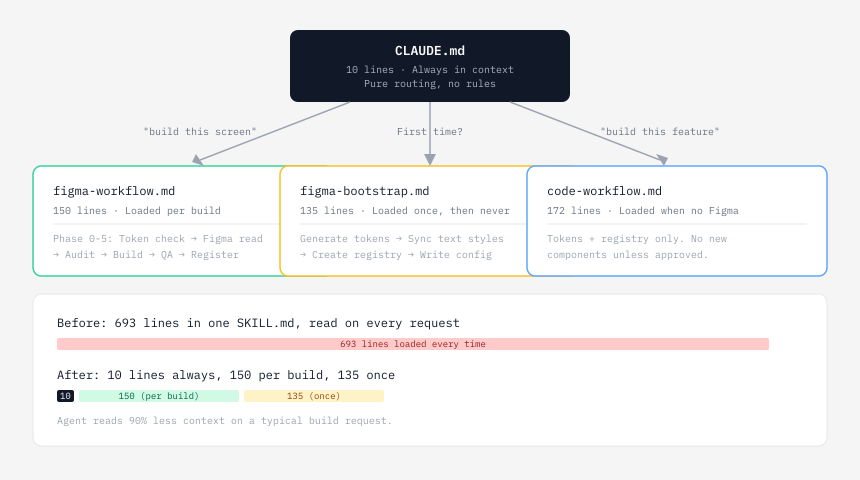
The workflow documentation grew to nearly 700 lines in a single file. The agent was reading bootstrapping instructions on every build even though bootstrap only runs once. I restructured into three files with progressive disclosure: CLAUDE.md (10 lines, pure routing), figma-workflow.md (the build phases, loaded per request), and figma-bootstrap.md (first-time setup, loaded once). I also split out a code-workflow.md for building screens without Figma using only existing tokens and components. That workflow is more constrained: if a component doesn't exist, it gets built as a one-off inline until you review and explicitly promote it.
Vesper: the agent
All of this came together into an agent I named Vesper. It's a design engineer: part pixel freak who notices if a border radius is off by 2px, part product designer who flags missing hover states and contrast failures, part frontend engineer who keeps the codebase clean. I studied the work of people like Jhey Tompkins, Emil Kowalski, Will King, and Jakub Czakon and distilled their approach into ten design principles that Vesper references when making visual decisions. Things like: motion should feel like a physical response, not decoration. Density should increase information without increasing effort. Type hierarchy does the heavy lifting before color does.
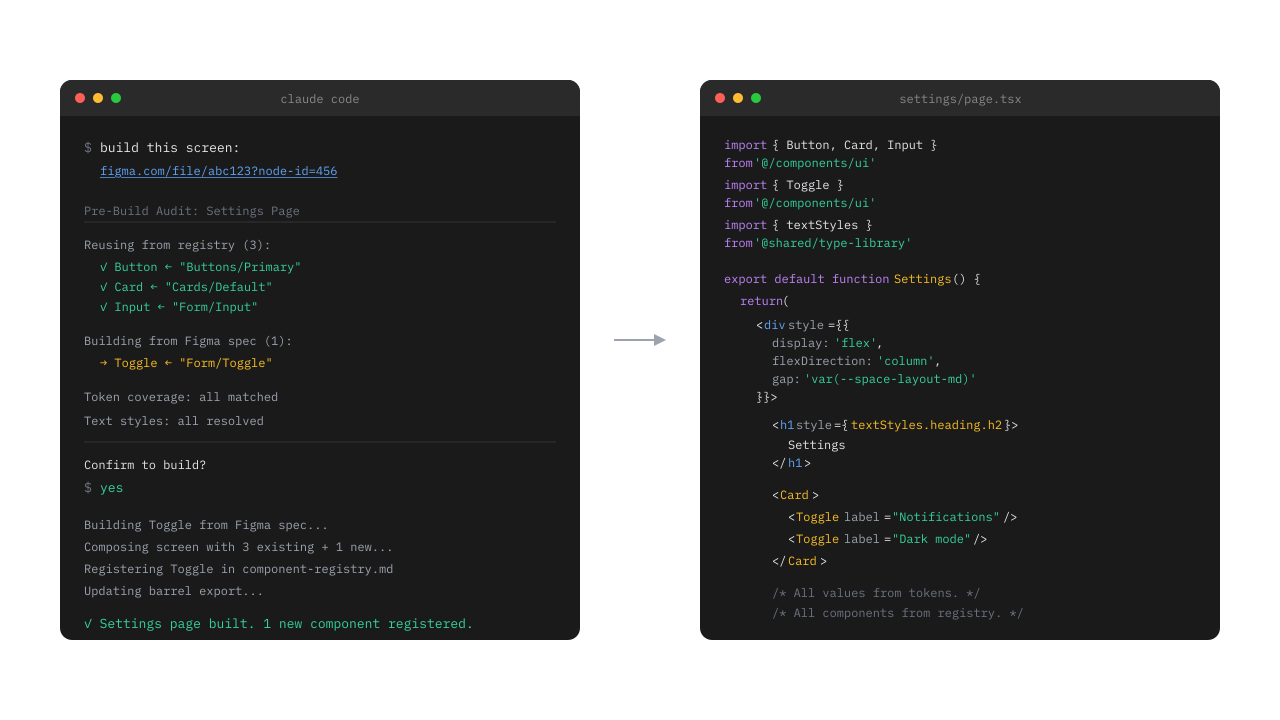
"Build this screen: [Figma link]." That's the entire interface. Vesper handles the rest.
What happens under the hood
Vesper reads the Figma link via MCP. It pulls out every layer, every auto layout frame, every color and spacing value. It maps each value against our tokens and flags anything missing. It checks the component registry for existing components, matching by Figma name. It shows you a full audit before writing any code: what it's reusing, what needs to be built new, and what's missing. You confirm, and it builds. Every auto layout frame becomes a flex div. Every color, spacing, and radius value references a token. Every text element uses the type library. New components get registered immediately. If it runs into something unexpected, it stops and asks.
Packaging for the team
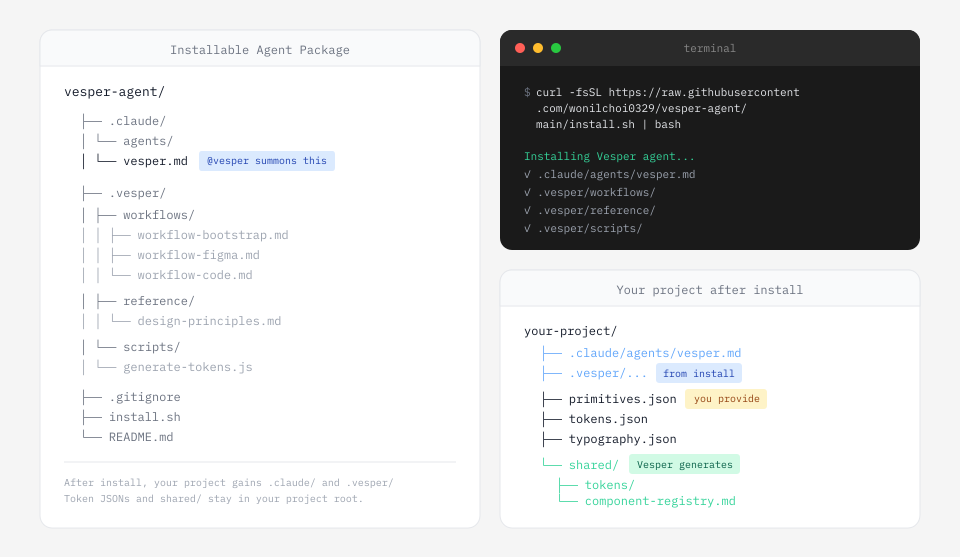
I packaged Vesper as a remote-installable agent for Claude Code. The repo lives on GitHub, and anyone on the team installs with a single curl command. It copies the agent definition into .claude/agents/ (so you can summon it with @vesper) and the workflow files, design principles, and token generator into a .vesper/ folder. The same command handles updates. Token JSON files and the shared output folder stay in the user's project since those are project data, not agent instructions.
What I took away from this
The biggest lesson was about where to put the rules. I kept trying to make the AI smarter about inferring things: matching component names, guessing typography tokens, knowing when to reuse. Every time, the answer was the same. Don't make it smarter, make the data more explicit. An exact Figma name field in the registry beats fuzzy matching. A "Does NOT cover" line beats trusting the agent not to over-build. A routing file that runs before MCP beats a clever skill description. The whole system works because the constraints are precise, not because the AI is clever.
One command, pixel-perfect output, zero drift between Figma and code. The component library grows from real designs, not assumptions.